
Your website might look stunning, but if visitors can’t find what they’re looking for quickly, they’ll leave. It’s that simple. Poor navigation is one of the most overlooked barriers between a visitor and a conversion, and it costs businesses far more than they realize.
Studies consistently show that users form an opinion about a website within milliseconds. After that snap judgment, they need a clear, intuitive path to explore your content. When menus are cluttered, labels are vague, or the structure doesn’t match how users think, you lose them, not just temporarily but often for good.
This guide breaks down the UX navigation best practices that turn confused visitors into engaged customers. From the psychology behind menu design to mobile-first principles and data-driven iteration, here’s everything you need to build a site that truly works.
The Psychology Behind Menu Design
Hick’s Law states that more choices lead to longer decision times. On a website, this means a crowded menu creates friction and abandonment. Trim your main menu to around seven items, based on Miller’s Law, which reflects the limits of working memory.
The goal is to reduce cognitive load. Every unnecessary item is a distraction.
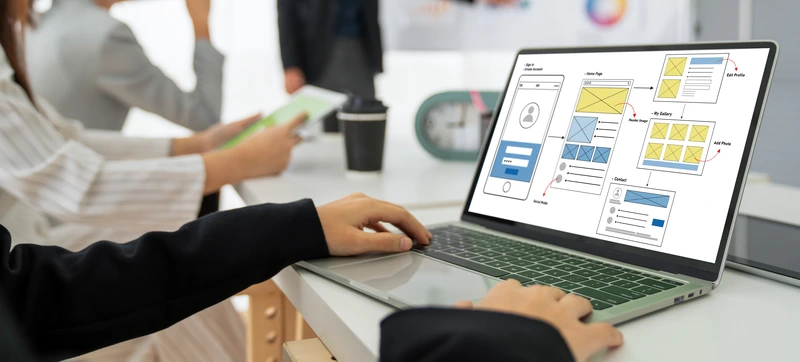
Structure is key. Treat your site like a pyramid: the homepage branches into clear categories. Vital information should be accessible within one or two clicks. Predictable navigation builds user trust and retention.
Use card sorting a UX technique to validate your structure by having real users group content. This aligns your information architecture with actual mental models, not internal assumptions.
Clear Labels and the Scent of Information
Think about how a user hunts for information online. They don’t read every word; they scan for cues that confirm they’re heading in the right direction. UX researchers call this the scent of information, the trail of trigger words and visual signals that give users confidence with each click.
Descriptive labels are essential. Generic terms like “Solutions” or “Things We Do” tell a visitor almost nothing. Specific labels like “Website Design & Development” or “Analytical Reporting” set clear expectations and reduce the cognitive effort required to navigate your site.
Avoid jargon where possible. Your internal terminology might mean a lot to your team, but it can confuse an outside visitor. When in doubt, use the language your customers actually use when searching for your product or service.
The same idea goes for CTAs in your navigation. Instead of vague stuff like “Click Here,” try phrases like “Get a Free Quote” or “View Our Work.” They work better because they immediately tell the user what they’ll get.
Helpful Navigation Features That Reduce Friction
Once your structure and labels are right, the right features can take the experience further.
Breadcrumb trails (e.g., Home > Services > PPC) give users a clear sense of where they are and how to backtrack without hitting the browser’s back button. They reduce frustration on deeper pages and subtly reinforce your site hierarchy. Location-based, attribute-based, and path-based breadcrumbs each serve different use cases depending on your site’s structure.
For content-heavy sites, mega menus and dropdowns allow categories and subcategories to surface without overwhelming the primary navigation. Adding images or icons inside these menus provides extra visual cues, helpful when you offer multiple distinct services or product ranges.
A well-implemented search bar is equally critical. Not every visitor wants to browse; some know exactly what they need. Make the search bar visible across all device types, and support it with auto-suggestions, typo tolerance, and natural language processing for a smoother experience. For product-rich sites, filtering chips and a “clear all” option help users narrow results quickly and intuitively.
The Seven Digital Approach to Navigation
At Seven Digital, we treat navigation as a strategic asset, not an afterthought. Our Dubai-based team builds websites where creativity and technical precision work together to guide visitors from arrival to conversion.
Our website design and development process begins with a deep understanding of how your target audience thinks and behaves. We map user journeys, audit existing structures, and apply proven UX frameworks before a single pixel is designed. The result is navigation that feels effortless, because every decision behind it was intentional.
We also factor in the bigger picture. A well-structured site supports your technical SEO by improving crawlability and internal linking, reinforces your PPC campaigns by reducing post-click friction, and feeds richer data into your analytical reporting so you can keep improving over time.
As AI-driven discovery continues to grow, clear site structure also plays a role in Generative Engine Optimisation (GEO), making your content more accessible and usable to AI models that increasingly mediate how users find information.
Mobile-First Navigation: Designing for the Device People Actually Use
Mobile accounts for the majority of web traffic globally, yet mobile navigation is frequently where user experience breaks down. Small screens demand a fundamentally different approach, not a scaled-down version of the desktop experience, but a purpose-built one.
Fitts’s Law offers a useful principle here: the time to tap a target is determined by its size and distance from the user’s thumb. Navigation elements should be large enough to tap comfortably (at least 44×44 pixels) and positioned within natural thumb zones, particularly for bottom navigation on mobile.
Secondary menu items can be tucked behind hamburger menus to keep the interface clean, but primary actions should remain prominent. Fluid grid layouts and fully responsive design ensure your navigation adapts gracefully to every screen size. The test is simple: a user should be able to navigate your entire site with one thumb, without zooming or squinting.
Navigation and Conversions: The Data Connection
Good navigation doesn’t just improve the experience, it drives business results. Lower bounce rates, longer session times, and higher conversion rates all correlate with intuitive menu structures and clear pathways.
The challenge is knowing what to fix. This is where behavioral data becomes invaluable. Heatmaps reveal exactly where users click, how far they scroll, and which navigation elements they ignore entirely. A menu item that nobody clicks is either unnecessary or mislabeled. An area generating unexpected clicks signals a gap between what users expect and what they find.
A/B testing and user feedback, combined with heatmap analysis, create a continuous cycle: hypothesize, test, measure, and refine. This iterative process is what turns your good navigation into great navigation.
We use this data to help our clients. Our analytical reporting service digs into how users behave on your site, pinpointing where they get stuck and finding ways to improve their path from their first click to buying.
From Visitor to Customer: Where to Go From Here

Website navigation optimization is not a one-time project. As your content grows, your audience evolves, and new devices emerge, your navigation needs to keep pace. The businesses that treat it as an ongoing discipline, not a launch-day checkbox, consistently outperform those that don’t.
Start by auditing your current menu structure. Count the items, test the labels, and ask whether a first-time visitor could find your three most important pages within ten seconds. If the answer is uncertain, there’s work to do.
Seven Digital’s team is ready to help you build a site that doesn’t just look the part, but performs at every level. From information architecture and responsive design to behavioral analytics and beyond, we bring creativity and strategy together to deliver results.
Get in touch with Seven Digital to discuss how we can transform your website into a high-performing conversion tool.